Booksy Biz: For Businesses
- 4.6
- Rating
- 1.00M
- Installs
- Free
- Price

 Analysis by App-foxy
Running a beauty business from a phone sounds simple until appointments, cancellations, staff availability, and last-minute changes start competing for your attention. I found Booksy Biz most useful when I treated it as a daily control panel rather than just a digital calendar. It is built for businesses, and its main job is to help manage a schedule while you are away from a desk.
That focus makes it different from a general calendar. A normal calendar can record an appointment, but it usually does not feel designed around the rhythm of a salon, barbershop, nail studio, or independent beauty professional. Booksy Biz sits closer to the booking side of the business, where the important question is not only “What is happening today?” but also “Can I keep the day accurate while people are calling, arriving, rescheduling, or asking for a different time?”
I would recommend it most to professionals who want their schedule accessible on the move and who are willing to spend a little time setting up a consistent routine. It is free to download, developed by Booksy International sp. z o.o., and listed for a Teen audience. The app has passed one million installs and holds a 4.6 average from roughly twenty-nine thousand ratings, which gives a useful indication that it has found a substantial audience among business users.
You May Also Like

 Blood Strike: 2.5 Anniversary
Blood Strike’s Loadouts Turn Every Drop Into a Tactical Gamble
A close look at Blood Strike’s custom loadouts: how fast access to signature weapons reshapes its battle royale rhythm, rewards preparation, and narrows the gap between fights.

 Pandora - Music & Podcasts
Pandora’s Music Is Easy to Start, but Harder to Recover
Pandora’s strength is its low-effort path from a seed to a station. Its weak spot is how much confidence it asks you to place in connection, setup, and quiet recovery.

 8 Ball Pool
 Is Built on Rivalries, Rematches, and Routine
A close look at the rivalries, rematches, shared routines, and unanswered safety questions that turn a quick pool match into a persistent mobile community.

 Samsung Music
’s Quiet Strength Is Playing What You Already Own
Its reach comes less from spectacle than from dependable access to a personal library. That simplicity is both the app’s strongest retention engine and its ceiling.

 AccuWeather: Weather Radar
AccuWeather Review: A Quick, Clear Forecast for Everyday Decisions
For everyday plans, the best forecast is the one you can understand quickly. AccuWeather makes rain timing, radar, and local conditions easy to act on, with a few trade-offs.

 Hill Climb Racing
Why Hill Climb Racing Still Turns Crashes Into One More Run
A tiny car, a bumpy hill and one more upgrade: Hill Climb Racing keeps resurfacing because its simple chaos makes every near-miss feel personal.
More From Our News Desk
View All News


How the everyday Booksy Biz workflow feels
When I look at the everyday Booksy Biz workflow, the useful question is not just how to enter an appointment, but how to keep the schedule reliable when a real workday gets interrupted. I’d focus on the small handoffs—checking a change, making sure the calendar reflects it, and returning to the day without relying on memory. That practical routine also makes it easier to spot which setup checks are worth doing first.
Start with the day, not the feature list
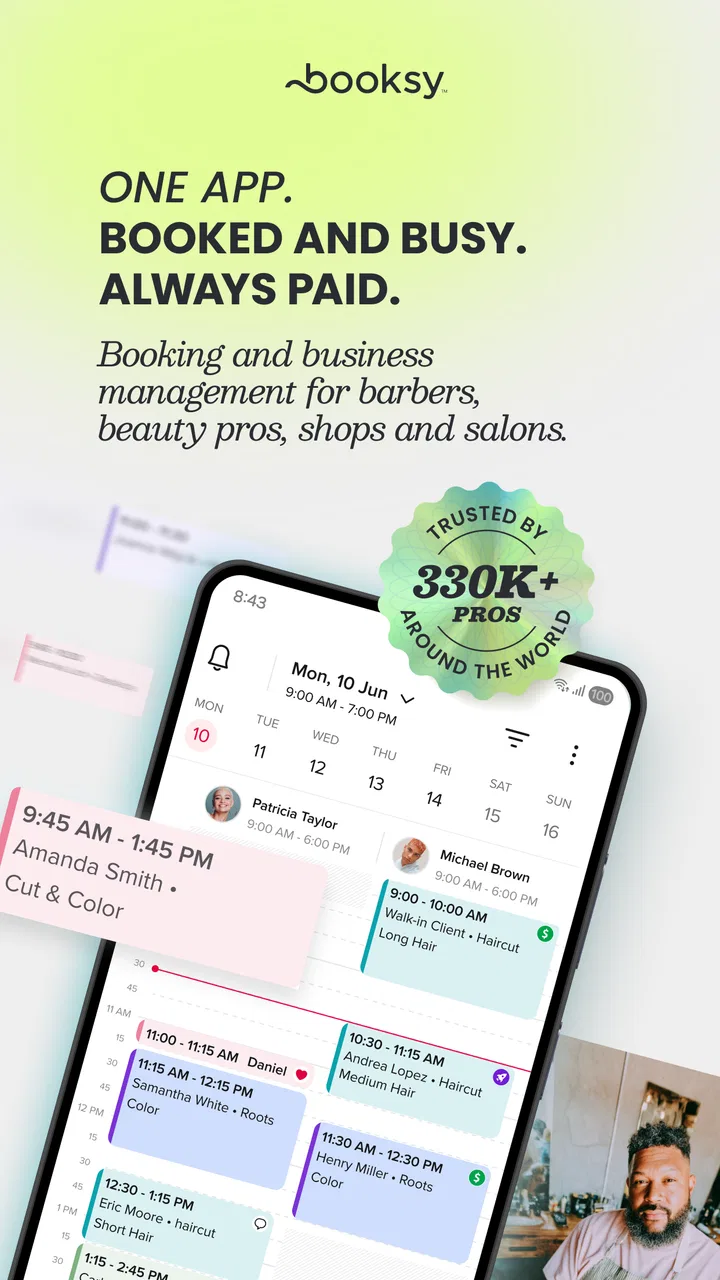
My preferred way to use Booksy Biz is to begin with the schedule view and ask three practical questions: what is already booked, where are the gaps, and which parts of the day are likely to change? That sounds obvious, but it prevents the common mistake of opening a business app only when something goes wrong. The value comes from keeping the calendar trustworthy before the busy period begins.
A realistic example would be a barber checking the phone while having breakfast. There may be a morning appointment, a longer service later, and an open space between them. Instead of relying on memory or scattered messages, the barber can use the app as the reference point for the day. If a client asks to move an appointment while the barber is between customers, the schedule can be checked immediately rather than promising a time that is already occupied.
That mobile-first approach is the strongest reason to choose this app over a paper diary. A notebook can be quick when one person controls it, but it becomes harder to keep current when plans change. Booksy Biz is more useful when the calendar must be updated during normal work: while commuting, between appointments, or during a short break.
The trade-off is that a digital schedule only helps if I update it consistently. Leaving changes in text messages or in my head defeats the purpose. I would establish one rule from the beginning: every confirmed change goes into Booksy Biz immediately, even if the appointment is several days away. That habit reduces the risk of offering a time that looked free only because the latest change was never recorded.
Use the calendar as a shared language
Beauty businesses often involve more than one person, even when the owner works alone most of the time. A stylist may need to understand the day at a glance, while an assistant may need to know which spaces are available for new requests. Booksy Biz becomes easier to manage when everyone follows the same naming and scheduling habits instead of using personal shorthand.
I would avoid vague notes such as “client” or “appointment” when more useful context can be entered. A clear service name makes the day easier to scan and helps distinguish a short visit from a booking that needs more preparation. This is not a flashy technique, but it is one of the most valuable improvements an experienced user can make because it reduces interpretation during busy hours.
Another helpful habit is to review tomorrow before finishing today. This catches gaps, awkward spacing, and appointments that may require a reminder or a preparation step. It also makes the next morning less reactive. The app cannot replace good business discipline, but it can give that discipline a dependable place to live.
Where it beats a general calendar
Google Calendar, Apple Calendar, or a paper planner may be enough for someone who only needs private reminders. They can be preferable if the business has very simple scheduling and the owner does not need a booking-focused workflow. Booksy Biz makes more sense when appointments are the center of the working day and the schedule must be managed as an operational tool.
I would not install it merely because it is a beauty app. The category is relevant, but the real decision depends on how much scheduling pressure the business has. A solo professional with a handful of regular clients may find a standard calendar faster. A growing practice with frequent changes, multiple service types, or a need to work away from a computer is more likely to benefit from Booksy Biz’s business-oriented approach.
Settings worth checking before relying on it
The first setup session matters more than it appears. I would inspect the business profile, working hours, available services, and any schedule-related preferences before inviting clients to rely on the calendar. A wrong opening period or an incomplete service setup can create confusion that looks like a booking problem when it is really a configuration problem.
Working hours deserve special attention. Many professionals think only about when they start and finish, but the shape of the day also matters. Breaks, preparation time, cleanup, and the difference between a quick service and a longer treatment all affect whether an apparently open slot is genuinely usable. If the app allows the business to reflect those distinctions, I would configure them before trying to optimize the calendar.
I would also check notifications early, then test them with a low-risk appointment or a personal booking. Notifications are useful only when they arrive at a sensible time and on the device that is actually being monitored. If alerts are too frequent, they become background noise; if they are missed, the schedule can feel less reliable than a handwritten note.
Another setting-related point is access. Since Booksy Biz is designed for business management on the go, I would decide who should be able to make changes and who only needs to view information, where the available account controls support that distinction. A small team benefits from shared visibility, but unrestricted editing can make it difficult to identify how a booking changed.
Build a repeatable opening and closing routine
Experienced users usually get more from appointment software through routines than through constant exploration. My opening routine would be short: check today’s schedule, review the first appointments, look for unusual gaps, and confirm that the phone is ready to receive important alerts. The closing routine would review the following day and record any changes that arrived through calls or messages.
This approach also helps answer a question many new users have: does the app replace a receptionist? In my view, no. It can reduce the amount of manual schedule handling, but it does not make decisions about difficult overlaps, special client needs, or whether a day is realistically manageable. A person still needs to supervise the calendar and respond thoughtfully when the situation falls outside the normal pattern.
Faster patterns for busy days
The quickest workflow is the one that minimizes repeated decisions. I would keep service names consistent, use the same approach to entering client details, and avoid creating several slightly different versions of the same appointment type. Consistency makes the calendar easier to scan and reduces the time spent correcting small errors later.
When a client asks for a change, I would first check the schedule, then update the existing booking rather than creating a second entry and hoping to remove the old one later. Duplicate entries are especially dangerous in a busy beauty business because they can make a genuinely free period look occupied or, worse, make the team prepare for two visits when only one exists.
A useful pattern for independent professionals is to reserve a brief review point between clusters of appointments. I would use that moment to check new requests, tidy changes, and prepare for the next block of work. The benefit is not that Booksy Biz makes the day shorter; it is that the app gives me a single place to perform the check instead of switching between a calendar, messages, and memory.
For teams, I would agree on a simple internal language. Everyone should know whether a booking is considered confirmed, pending, moved, or cancelled, and everyone should update it in the same way. If the app presents those distinctions through its available workflow, using them consistently is more important than adding elaborate personal notes.
There is also a practical trade-off between speed and detail. Entering more information can make a booking clearer, but too much text slows down reception during a queue. I would capture the details that affect the service and timing, then leave nonessential commentary out. The goal is a schedule that another person can understand in seconds.
Handling the awkward cases
Booksy Biz is most valuable when plans change, but changes are also where any scheduling tool requires judgment. If a client is late, I would not automatically move every later appointment. I would check the remaining time, the service involved, and the effect on the rest of the day before changing anything. The app can show the schedule; it cannot decide what compromise protects both the client experience and the business.
Likewise, an empty slot is not always an invitation to fill it. A gap may be needed for cleaning, preparation, travel, or recovery between demanding services. I would treat open space as a business decision rather than assuming every minute should be sold. This is one of the places where a standard calendar may feel just as capable: the advantage comes from how carefully the owner interprets and maintains the schedule.
For cancellations, I would update the calendar as soon as the decision is final and then use the newly visible opening deliberately. It may be suitable for a short service, a regular client who wants an earlier time, or a genuine break. Keeping the slot visible helps, but filling it should not become an automatic reaction that creates an exhausting day.
What the app cannot solve by itself
The app is not a complete answer for every beauty business. If the main challenge is inventory, accounting, staff payroll, detailed customer relationship management, or complex reporting, I would expect to need other tools as well. Booksy Biz is strongest around appointment administration, not as a universal replacement for every system a mature business may use.
I would also be cautious if the business rarely changes its schedule and already has a reliable system that everyone follows. Moving to a new app has a learning cost. The benefit must be greater than the effort of transferring habits, training staff, and checking that old records are handled properly.
Another limitation is dependence on disciplined digital behavior. A professional who prefers a paper diary and dislikes updating apps after phone calls may find the software frustrating. The issue is not necessarily that the calendar is difficult; it is that the business workflow must be organized around one source of truth.
Version, device expectations, and cost
On Android, the current version is 26.02.1600 and the app requires Android 8.0 or later. That makes it worth checking the operating system on an older work phone before planning to use it as the main scheduling device. A business phone should also have dependable battery life and notifications enabled, because a calendar that is technically installed but rarely checked will not improve the working day.
Booksy Biz is free to download, which lowers the barrier to testing it. The listing also shows in-app purchase items ranging from about twenty-five dollars to just over three hundred dollars each. I would therefore treat the download price and the possible business costs as separate questions. Before building the entire operation around the app, I would review which paid options are relevant to the specific workflow and make sure the expected value is clear.
The Teen content rating is not a statement about whether the app is suitable for a particular business; it is simply the store’s age classification. For an owner, the more important questions are whether the phone meets the operating-system requirement, whether the team will use the schedule consistently, and whether the available business functions match the way appointments are actually handled.
A sensible path to mastery
I would begin with a small, controlled setup rather than trying to configure every possible detail on the first day. Add the core services, establish accurate hours, enter a few realistic appointments, and walk through the changes that happen most often. This reveals friction quickly and prevents a complicated setup from hiding basic mistakes.
After that, I would create a weekly review habit. Look for repeated problems: services that regularly run over time, gaps that are too short to use, or changes that are being recorded outside the app. Those patterns tell me what needs adjusting. The important insight is that the calendar is also a mirror of the business process. If the schedule constantly needs emergency edits, the issue may be the service timing or booking policy rather than the interface.
I would keep a backup communication habit for unusual situations, but I would avoid maintaining two full calendars. A second complete diary creates competing versions of the truth. Use another channel for urgent contact if necessary, then return to Booksy Biz to make the lasting schedule update.
My verdict for different types of users
For a solo stylist, barber, nail technician, or similar professional who wants a business-focused schedule available on a phone, Booksy Biz is a practical choice to investigate. Its strongest quality is not a single clever trick; it is the way it encourages appointments to become a managed workflow rather than isolated entries.
For a team, the value depends on shared habits. The app can help everyone see the same working picture, but only if staff agree on how to enter, change, and review bookings. Without that agreement, more users can mean more inconsistency.
For someone who only needs occasional reminders, I would choose a simpler calendar. For a business with complex operations beyond appointments, I would use Booksy Biz alongside specialized tools rather than expecting it to handle everything. And for anyone unwilling to keep the schedule updated after calls or messages, no appointment platform will feel dependable for long.
After using it as a daily planning tool, my opinion is positive but measured. Booksy Biz is best when I use it deliberately: configure the working day carefully, keep service information consistent, review tomorrow before closing, and treat every confirmed change as something that belongs in the calendar immediately. The real advantage is a repeatable scheduling habit, not simply having another app on the phone.
That makes it a good fit for beauty professionals who are growing beyond a paper diary or scattered messages and want a more organized mobile workflow. It is less compelling for very simple schedules or businesses looking for a complete all-in-one management suite. If your day revolves around appointments and your team can commit to one accurate calendar, Booksy Biz has enough practical value to earn a place in the routine.
FAQs for Booksy Biz: For Businesses
01What is Booksy Biz and how can it benefit my business?
Booksy Biz is a comprehensive appointment scheduling and management app designed for service-based businesses like salons, spas, and barbershops. It helps streamline operations by allowing clients to book appointments online, reducing the need for phone calls and freeing up time for staff. The app also offers tools for managing customer relationships, inventory, and sales, making it an all-in-one solution for business efficiency.
02Is Booksy Biz user-friendly for both staff and clients?
Yes, Booksy Biz is designed with user-friendliness in mind. The interface is intuitive, allowing staff to easily manage appointments, access client information, and generate reports. Clients benefit from a seamless booking process that can be completed in just a few clicks, enhancing their overall experience and satisfaction with your services.
03Does Booksy Biz integrate with other systems or software?
Booksy Biz offers integrations with popular platforms such as Google Calendar, Facebook, and Instagram, allowing you to sync appointments and promote your services across multiple channels. This integration capability helps streamline your workflow and ensures that your online presence is cohesive and effective in attracting and managing clients.
04What kind of customer support does Booksy Biz offer?
Booksy Biz provides robust customer support to ensure users have a smooth experience. Support options include a comprehensive help center, live chat, and email support. Additionally, the Booksy Biz team offers onboarding assistance and training resources to help businesses maximize the app’s features and functionalities.
05Is Booksy Biz secure for handling sensitive client information?
Yes, Booksy Biz prioritizes the security of client data. The app employs advanced encryption protocols to protect personal and payment information. Regular security updates are performed to ensure the platform remains secure against potential threats, providing peace of mind for both businesses and their clients.
Pros
- User-friendly interface simplifies scheduling.
- Efficient client management tools included.
- Automated reminders reduce no-shows.
- Secure payment processing available.
- Customizable settings for business needs.
Cons
- Limited offline functionality.
- Occasional sync issues reported.
- Some features require premium subscription.
- Learning curve for new users.
- Customer support response may vary.

Booksy Biz: For Businesses
Gallery